Friday, October 23, 2026

How to Go Live on Kick.com Using GoLiveIndia
How to Go Live on Kick.com Using GoLiveIndia
Kick.com is an emerging live streaming platform gaining popularity among creators for its flexible content guidelines, fast-growing audience, and streamer-friendly revenue model. Whether you're a gamer, artist, musician, or educator, Kick offers a fresh opportunity to connect with viewers.
With the GoLiveIndia app, going live on Kick becomes quick and effortless no need for OBS, manual RTMP setups, or complicated stream keys. Just use your phone, and you're ready to stream in minutes.
In this guide, we’ll walk you through exactly how to go live on Kick.com using GoLiveIndia.
Why Stream on Kick.com with GoLiveIndia?
GoLiveIndia is designed to simplify live broadcasting for creators of all experience levels. With direct RTMP support and simple integration, you can:
Go live on Kick.com directly from your mobile device
Stream recorded content or go live in real time
Loop content like short videos or gameplay replays
Skip the technical setup and start streaming instantly
Broadcast in HD from anywhere, anytime
Manage everything in one place via the GoLiveIndia app
If you're looking for an easy, reliable way to grow your presence on Kick, GoLiveIndia is the perfect solution.
Step-by-Step: How to Go Live on Kick.com Using GoLiveIndia
Step 1: Install the GoLiveIndia App
Start by downloading the GoLiveIndia app:
Android: Available on Google Play Store
iOS: Available on the App Store
Web: www.goliveindia.in
After installation, open the app and sign in using your preferred login method (Google, Facebook, Apple, or email).
Step 2: Get Your Kick Stream URL ; Stream Key
Since Kick.com currently doesn’t support direct API integration, you’ll need to copy your RTMP credentials manually:
Log in to your Kick.com account
Go to your Creator Dashboard
Click on Settings > Stream
Copy the RTMP URL and Stream Key
Keep this window open—you’ll need these details in the next step.
Step 3: Set Up the Live Stream on GoLiveIndia
Now that you have your Kick stream key:
Open the GoLiveIndia app
Tap Create Live and select Custom RTMP
Paste the RTMP URL and Stream Key from Kick.com
Choose your stream type:
Upload a recorded video
Enter a video URL
Use your camera to stream live
Add a stream title and description
Select your preferred resolution (480p, 720p, 1080p)
Once everything is set, tap Go Live. You’re now streaming on Kick.com!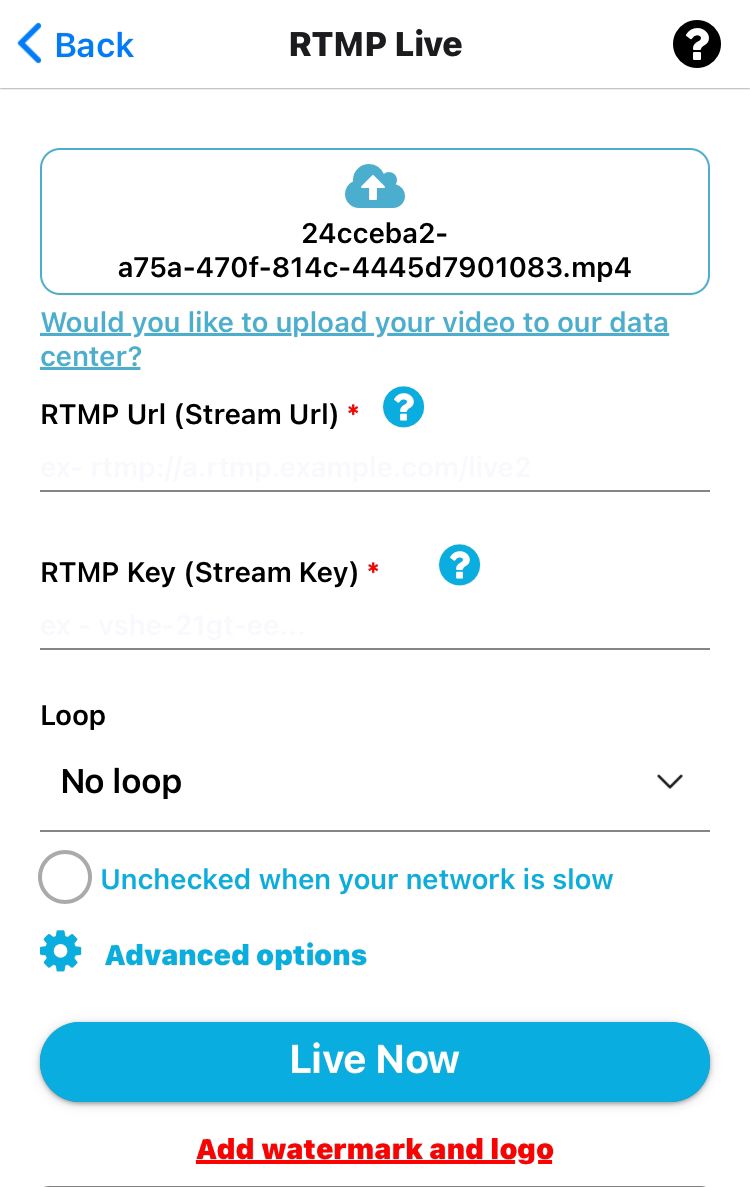
Step 4: End and Monitor Your Stream
When you're done:
Tap End Stream in the GoLiveIndia app
Review your broadcast summary
Your stream will appear on Kick.com, depending on your Kick settings
Frequently Asked Questions (FAQ)
Q1: Do I need OBS or a PC to stream on Kick.com?
No. With GoLiveIndia, you can stream directly from your phone without needing any desktop software.
Q2: Is streaming on Kick free with GoLiveIndia?
Yes. You can use GoLiveIndia’s basic features for free. Advanced features like multistreaming and higher resolution are available in premium plans.
Q3: Can I stream on Kick and YouTube at the same time?
Yes. GoLiveIndia supports multistreaming. You can go live on Kick, YouTube, Facebook, and other platforms simultaneously.
Q4: Does Kick have a mobile app for creators?
Currently, Kick’s mobile app is mainly for viewers. GoLiveIndia fills the gap by allowing mobile users to stream directly to Kick.
Q5: How do I find my stream key on Kick?
Go to your Kick Creator Dashboard > Settings > Stream to view your unique RTMP URL and Stream Key.
Final Thoughts
Kick.com is quickly becoming a go-to platform for streamers who want more freedom and better monetization options. And with GoLiveIndia, going live on Kick is easier than ever—no desktop setup or technical know-how required.
Whether you’re live streaming games, interviews, or looping short videos, GoLiveIndia gives you the flexibility and power to reach your audience on Kick—right from your phone.
Start your Kick.com streaming journey today with GoLiveIndia—anytime, anywhere.